


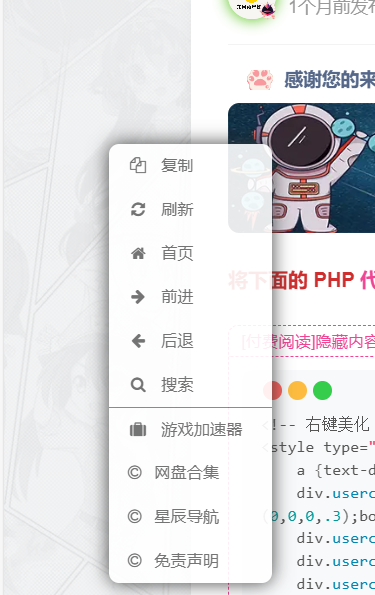
1.网站右键添加自定义的按钮美化
<!-- 右键美化 开始 -->
<style type="text/css">
    a {text-decoration: none;}
    div.usercm{background-repeat:no-repeat;background-position:center center;background-size:cover;background-color:#fff;font-size:13px!important;width:130px;-moz-box-shadow:1px 1px 3px rgba
(0,0,0,.3);box-shadow:0px 0px 15px #333;position:absolute;display:none;z-index:10000;opacity:0.9; border-radius: 8px;}
    div.usercm ul{list-style-type:none;list-style-position:outside;margin:0px;padding:0px;display:block}
    div.usercm ul li{margin:0px;padding:0px;line-height:35px;}
    div.usercm ul li a{color:#666;padding:0 15px;display:block}
    div.usercm ul li a:hover{color:#fff;background:rgba(170,222,18,0.88)}
    div.usercm ul li a i{margin-right:10px}
    a.disabled{color:#c8c8c8!important;cursor:not-allowed}
    a.disabled:hover{background-color:rgba(255,11,11,0)!important}
    div.usercm{background:#fff !important;}
    </style>
<div class="usercm" style="left: 199px; top: 5px; display: none;">
    <ul>
        <li><a href="javascript:void(0);" rel="external nofollow"  rel="external nofollow"  onclick="getSelect();"><i class="fa fa-copy fa-fw"></i><span>复制</span></a></li>
        <li><a href="javascript:window.location.reload();" rel="external nofollow" ><i class="fa fa-refresh fa-fw"></i><span>刷新</span></a></li>
        <li><a href="https://www.zibll.com/?golink=aHR0cHM6Ly94Y2p5Z3pzLmNuLw==&nonce=3d035514c2"  rel="external nofollow" ><i class="fa fa-home fa-fw"></i><span>首页</span></a></li>
        <li><a href="javascript:history.go(1);" rel="external nofollow" ><i class="fa fa-arrow-right fa-fw"></i><span>前进</span></a></li>
        <li><a href="javascript:history.go(-1);" rel="external nofollow" ><i class="fa fa-arrow-left fa-fw"></i><span>后退</span></a></li>
        <li style="border-bottom:1px solid gray"><a href="javascript:void(0);" rel="external nofollow"  rel="external nofollow"  onclick="baiduSearch();"><i class="fa fa-search fa-fw"></i><span>搜索</span></a></li>
        <li><a target="_blank" href="https://xcjygzs.cn/gameaccelerator" rel="external nofollow" ><i class="fa fa-suitcase fa-fw"></i><span>游戏加速器</span></a></li>
        <li><a href="链接"><i class="fa fa-copyright"></i><span>网盘合集</span></a></li>
        <li><a href="链接"><i class="fa fa-copyright"></i><span>星辰导航</span></a></li>
        <li><a href="链接"><i class="fa fa-copyright"></i><span>免责声明</span></a></li>
        </ul>
</div>
<script type="text/javascript">
    (function(a) {
        a.extend({
            mouseMoveShow: function(b) {
                var d = 0,
                    c = 0,
                    h = 0,
                    k = 0,
                    e = 0,
                    f = 0;
                a(window).mousemove(function(g) {
                    d = a(window).width();
                    c = a(window).height();
                    h = g.clientX;
                    k = g.clientY;
                    e = g.pageX;
                    f = g.pageY;
                    h + a(b).width() >= d && (e = e - a(b).width() - 5);
                    k + a(b).height() >= c && (f = f - a(b).height() - 5);
                    a("html").on({
                        contextmenu: function(c) {
                            3 == c.which && a(b).css({
                                left: e,
                                top: f
                            }).show()
                        },
                        click: function() {
                            a(b).hide()
                        }
                    })
                })
            },
            disabledContextMenu: function() {
                window.oncontextmenu = function() {
                    return !1
                }
            }
        })
    })(jQuery);

    function getSelect() {
        "" == (window.getSelection ? window.getSelection() : document.selection.createRange().text) ? layer.msg("请选择需要百度的内容!") : document.execCommand("Copy")
    }
    function baiduSearch() {
        var a = window.getSelection ? window.getSelection() : document.selection.createRange().text;
        "" == a ? layer.msg("请选择需要搜索的内容!") : window.open("https://www.fengxue.cc/?s=" + a)
    }
    $(function() {
        for (var a = navigator.userAgent, b = "Android;iPhone;SymbianOS;Windows Phone;iPad;iPod".split(";"), d = !0, c = 0; c < b.length; c++) if (0 < a.indexOf(b[c])) {
            d = !1;
            break
        }
        d && ($.mouseMoveShow(".usercm"), $.disabledContextMenu())
    });
</script>
<!-- 右键美化-结束  -->
将代码复制在子比主题设置-自定义代码-自定义底部HTML代码中即可使用(自行更换相关链接)
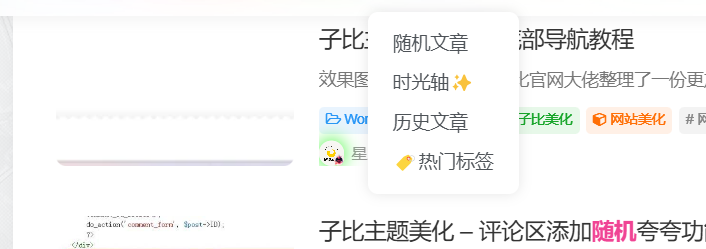
2.网站添加随机看看
教程
将以下 PHP 代码加入到主题目录中的 themes/zibll/functions.php 文件的即可
添加完成之后访问:你网站的域名/?random 即可看到效果
// 添加随便看看(BY www.xcjygzs.cn)
function random_postlite() {
global $wpdb;
$query = "SELECT ID FROM $wpdb->posts WHERE post_type = 'post' AND post_password = '' AND post_status = 'publish' ORDER BY RAND() LIMIT 1";
if ( isset( $_GET['random_cat_id'] ) ) {
$random_cat_id = (int) $_GET['random_cat_id'];
$query = "SELECT DISTINCT ID FROM $wpdb->posts AS p INNER JOIN $wpdb->term_relationships AS tr ON (p.ID = tr.object_id AND tr.term_taxonomy_id = $random_cat_id) INNER JOIN $wpdb->term_taxonomy AS tt ON(tr.term_taxonomy_id = tt.term_taxonomy_id AND taxonomy = 'category') WHERE post_type = 'post' AND post_password = '' AND post_status = 'publish' ORDER BY RAND() LIMIT 1";
}
if ( isset( $_GET['random_post_type'] ) ) {
$post_type = preg_replace( '|[^a-z]|i', '', $_GET['random_post_type'] );
$query = "SELECT ID FROM $wpdb->posts WHERE post_type = '$post_type' AND post_password = '' AND post_status = 'publish' ORDER BY RAND() LIMIT 1";
}
$random_id = $wpdb->get_var( $query );
wp_redirect( get_permalink( $random_id ) );
exit;
}
if ( isset( $_GET['random'] ) )
add_action( 'template_redirect', 'random_postlite' );
// 随便看看结束(BY www.xcjygzs.cn)
文章很赞,支持一下吧~
还没有人为TA充电
为TA充电
© 版权声明
THE END
喜欢就支持一下吧




![表情[yiwen]|风雪源码](https://www.fengxue.cc/wp-content/themes/zibll/img/smilies/yiwen.gif)

暂无评论内容